
If you're anything like me, your travel research is everywhere. A Google Maps list from six months ago. A Notes app doc called "Tokyo maybe." Fifteen browser tabs you're afraid to close. A screenshot of a restaurant someone mentioned on Instagram that you'll never find again.
I built Travally because I wanted one place to put all of it. Not another AI trip planner that generates a generic itinerary for you. Just a simple, smart tool that takes the links you're already saving and makes them actually useful.
Here's how it works.
Step 1: Save a Link
This is the whole starting point. Find a cool restaurant on Eater? Copy the URL, paste it into Travally. That's it.
You can paste links directly in the app, or install the Chrome extension to save pages in one click while you're browsing. Both work the same way. If you've already been hoarding Google Maps lists (no judgment), you can import those too with a single click. The filename becomes your tag, so your "Portland Food" list stays organized as "Portland Food."
Travally works with pretty much any travel-related URL. Restaurants, hotels, Airbnb listings, attractions, blog posts, AllTrails pages, you name it. If it's a place or an experience, Travally knows what to do with it.
Step 2: Watch the Magic Happen
This is the part that surprises people.
When you paste a bare URL, Travally doesn't just bookmark it. It reads the page and pulls in everything useful: ratings, review counts, price level, hours of operation, address, phone number, photos, and a Google Maps embed. It even auto-detects what type of place it is (restaurant, hotel, attraction, activity) and categorizes it for you.
A raw URL goes in. A rich, glanceable travel card comes out. No manual data entry, no copying and pasting details into a spreadsheet. You save a link and get back something you can actually use.
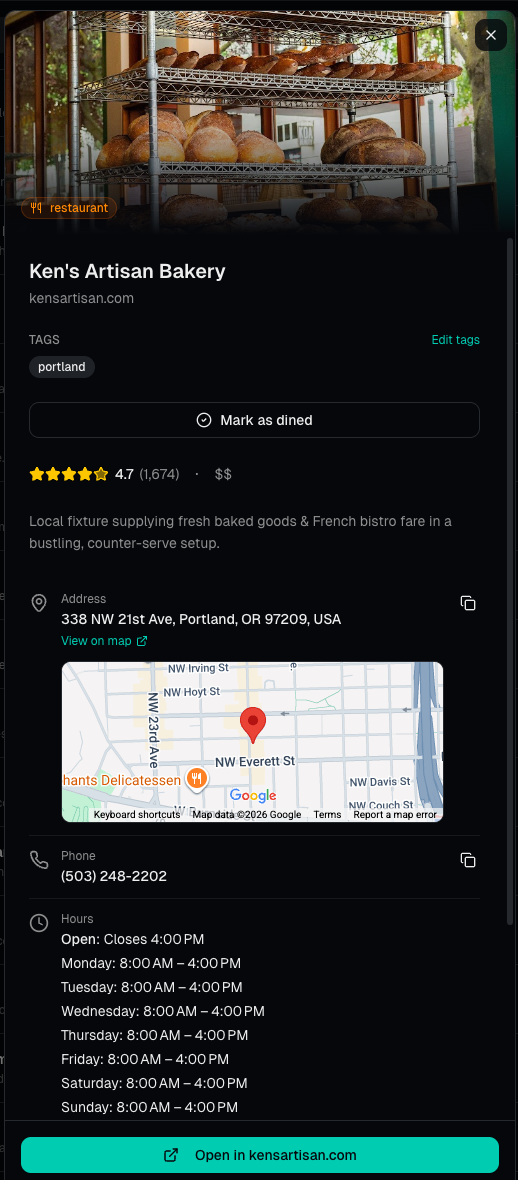
Each saved place becomes a card like this — everything you need, without lifting a finger.
Step 3: Organize However You Think
Once your links are saved and enriched, you can tag them however makes sense to you. Tag by trip ("Japan 2026"), by city ("Kyoto," "Osaka"), by vibe ("date night," "rainy day backup"), or by who recommended it ("from Sarah," "Reddit find"). However your brain works.
The point is that Travally adapts to how you already think about your trips, not the other way around.
Step 4: Actually Use It When You're There
This is where the real value kicks in, and it's the part most bookmark tools completely miss. Saving stuff is easy. Finding it three weeks later when you're standing on a street corner in a new city is the hard part.
Travally has a map view so you can see all your saves plotted out geographically. Zoom into a neighborhood and see what you've collected there. Sort by distance to find what's closest to where you are right now. Filter by type to see just restaurants, or just hotels, or just activities. Search across all your saves, tags, and notes to find that rooftop bar your coworker mentioned or the hotel with the pool. Glance at any card and get the rating, hours, and address without clicking through to load the original page.
And if you've saved a bunch of stuff and can't remember the specifics, you can ask the AI assistant. It's grounded in your actual research, not generic recommendations. Ask it things like "which restaurants did I save in Portland?" or "what Kyoto spots are best for mornings?" and it'll pull from your collection to give you a real answer.
Who Is This For?
Travally is for people who do their own trip research. The person in the friend group who always has a list. The one who reads food blogs, follows local accounts, collects recommendations from friends, and curates their own travel plans instead of handing it off to an algorithm.
If that's you, your research deserves a better home than a pile of browser tabs and scattered screenshots.
Travally is free to start. No credit card, no commitment. Just paste your first link and see what happens.
If you've got Google Maps lists you've been building for years, the import tool is the fastest way to go from "interested" to "invested." One click and all that research is structured, searchable, and ready for your next trip.